Friday, July 8, 2022

Install Samba with no password


yum install samba* -y

systemctl start smb
systemctl start nmb

systemctl enable smb
systemctl enable nmb


mkdir -R /var/www/html/soft
chmod -R 775 /var/www/html/soft
chown -R nobody:nobody /var/www/html/soft


vi /etc/samba/smb.conf

workgroup = hppl.com
netbios name = CentOS7
map to guest = bad user


[EveryoneAccess]
comment = Allow Everyone Access
path = /var/www/html/soft
browsable = yes
writable = yes
guest ok = yes
read only = no
create mode = 0775
directory mode = 0775


Friday, November 28, 2014

CPAN installation guide


Yes, the CPAN shell isn't working well with these ....
First make sure, you have the "apache-devel" files.
The command 'which apxs' will tell.
( '/usr/include/"httpd"/ap_release.h' is needed too.)
( "httpd", "apache", "apache2", Linux OS name dependent.)

The modules : You will have to install them manually, in this order :

EDIT : The install order was changed.

2) Apache::Test ( required to run 'make test' on Apache-Reload )
> > Apache-Test-1.30.tar.gz
http://search.cpan.org/~phred/Apache...Apache/Test.pm
http://search.cpan.org/CPAN/authors/...st-1.30.tar.gz
cd Apache-Test-1.30/ , perl Makefile.PL , make , make test , # make install
... Apache-Test will only work, if installed / reinstalled after
the "apache-devel", and must appear when doing 'instmodsh -l'.

1) ModPerl::MM > > mod_perl-2.0.4.tar.gz
http://search.cpan.org/CPAN/authors/...l-2.0.4.tar.gz

3) Apache::Reload > > Apache-Reload-0.10.tar.gz
http://search.cpan.org/CPAN/authors/...ad-0.10.tar.gz
.....
Good luck !
Thanks,

Shekhar Patil
Hindustan Pencils Pvt.Ltd.
EDP Dept.


Friday, November 7, 2014

Search nearest PC IP by linux shell command


for ip in $(seq 1 254); do ping -c 1 10.51.1.$ip>/dev/null; [ $? -eq 0 ] && echo "10.51.1.$ip UP" || : ; done

Thursday, October 30, 2014

Linux Create An FTP User Account

Linux Create An FTP User Account

Now your FTP server is up and running. It is time to add additional users to FTP server so that they can login into account to upload / download files. To add a user called tom and set the password, enter:
# adduser -c 'FTP USER Tom' -m tom
# passwd tom
Now tom can login using our ftp server. Make sure the following is set in vsftpd.conf

local_enable=YES

Restart the vftpd:
# service vsftpd restart


CentOS / RHEL 7: Install GCC (C and C++ Compiler) and Development Tools

CentOS / RHEL 7: Install GCC (C and C++ Compiler) and Development Tools

How do I install gnu gcc compiler and related tools such as autoconf, automake, flex, c++ compiler, and bison on a CentOS 7 or Red Hat Enterprise Linux version 7 server?

You can setup a basic development environment with the following packages on a CentOS Enterprise Linux or Red Hat Enterprise Linux version 7:

  1. autoconf
  2. automake
  3. binutils
  4. bison
  5. flex
  6. gcc
  7. gcc-c++
  8. gettext
  9. libtool
  10. make
  11. patch
  12. pkgconfig
  13. redhat-rpm-config
  14. rpm-build
  15. rpm-sign

Open the Terminal app and type the following commands.

Command to list groups on a CentOS / RHEL 7

Type the following yum command:
# yum group list
Sample outputs:

Fig. 01: CentOS / RHEL 7: List Package Groups Command

Command to install GCC and Development Tools on a CentOS / RHEL 7 server

Type the following [nixcmd name="yum" as root user:
# yum group install "Development Tools"
OR
$ sudo yum group install "Development Tools"
Sample outputs:

Verify your gcc installation on a CentOS / RHEL 7 server

Type the following command to see gcc location:

$ whereis gcc
gcc: /usr/bin/gcc /usr/lib/gcc /usr/libexec/gcc /usr/share/man/man1/gcc.1.gz

Type the following command to see gcc compiler version:

$ gcc --version
gcc (GCC) 4.8.2 20140120 (Red Hat 4.8.2-16)
Copyright (C) 2013 Free Software Foundation, Inc.
This is free software; see the source for copying conditions.  There is NO
warranty; not even for MERCHANTABILITY or FITNESS FOR A PARTICULAR PURPOSE.

Test gcc C compiler with a sample foo.c program

Create a file called foo.c as follows:

 
#include<stdio.h>
int main(void){
        printf("Hello World!\n");
        return 0;
}
 

To compile foo.c into foo executable file, type:
$ cc foo.c -o foo
To execute foo program, type:

$ ./foo
Hello World!


CentOS / RHEL 7 Restart / Stop / Start Networking Command

CentOS / RHEL 7 Restart / Stop / Start Networking Command

I recently installed CentOS Linux version 7 or Red Hat Enterprise Linux version 7. How can I restart networking service using command line options? How can I start / stop and restart networking service on a CentOS/RHEL 7 based system?

CentOS 7 / RHEL 7 / Fedora Linux (many other modern distor) uses Systemd. It is a system and service manager for Linux operating systems. In newer distro such as CentOS7/RHEL7 systemd replaces Upstart as the default init system.

In older versions of CentOS or Red Hat Enterprise Linux, you used init scripts located in the /etc/rc.d/init.d/ directory. These init scripts were typically written in Bash, and allowed the system administrator to control the state of services and daemons in their system. In CentOS/RHEL 7, these init scripts have been replaced with service units.

CentOS 7 / RHEL 7 networking service name

To bring up/down networking service you need to use the network.service.

Say hello to systemctl command

Use this command to control the systemd system and act as a service manager.

CentOS 7 / RHEL 7 get status of network service

sudo systemctl status network.service

OR

sudo systemctl status network

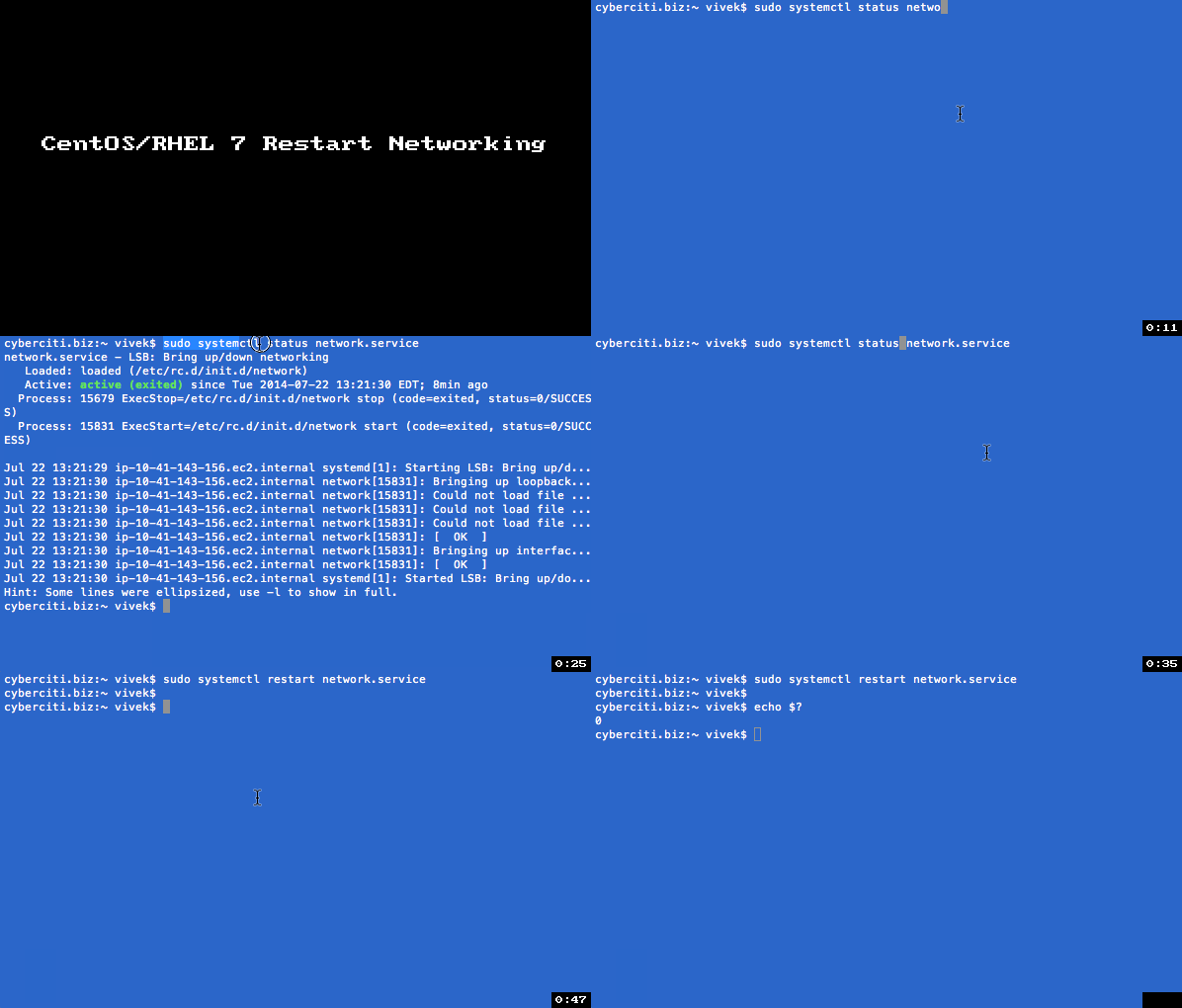
Sample outputs:

Fig.01: CentOS / RHEL 7 Networking Service Status Command

CentOS 7 / RHEL 7 restart network service

sudo systemctl restart network.service

OR

sudo systemctl restart network

CentOS 7 / RHEL 7 start network service

sudo systemctl start network.service

OR

sudo systemctl start network

CentOS 7 / RHEL 7 stop network service

sudo systemctl stop network.service

OR

sudo systemctl stop network

Sample outputs:

Animated gif 01: systemctl command in action

A note about old service and chkconfig command

The service and chkconfig commands are still available in the system and work as expected, but are only included for compatibility reasons and should be avoided as may be dropped in future release.


Install EPEL Repo on a CentOS and RHEL 7.x

Install EPEL Repo on a CentOS and RHEL 7.x

How do I install the extra repositories such as Fedora EPEL repo on a Red Hat Enterprise Linux server version 7.x or CentOS Linux server version 7.x?

You can easily install various packages by configuring a CentOS 7.x or RHEL 7.x system to use Fedora EPEL repos and third party packages. Please note that these packages are not officially supported by either CentOS or Red Hat, but provides many popular packages and apps.

How to install RHEL EPEL repository on Centos 7.x or RHEL 7.x

The following instuctions assumes that you are running command as root user on a CentOS/RHEL 7.x system and want to use use Fedora Epel repos.

Install the extra EPEL repositories

The command is as follows to download epel release for CentOS and RHEL 7.x using wget command:

 
cd /tmp
wget https://dl.fedoraproject.org/pub/epel/7/x86_64/e/epel-release-7-2.noarch.rpm
ls *.rpm
 

To install epel-release-7-2.noarch.rpm, type:

 
sudo yum install epel-release-7-2.noarch.rpm
 

Sample outputs:

Loaded plugins: amazon-id, rhui-lb
Examining epel-release-7-2.noarch.rpm: epel-release-7-2.noarch
Marking epel-release-7-2.noarch.rpm to be installed
Resolving Dependencies
--> Running transaction check
---> Package epel-release.noarch 0:7-2 will be installed
--> Finished Dependency Resolution
 
Dependencies Resolved
 
================================================================================
 Package            Arch         Version   Repository                      Size
================================================================================
Installing:
 epel-release       noarch       7-2       /epel-release-7-2.noarch        22 k
 
Transaction Summary
================================================================================
Install  1 Package
 
Total size: 22 k
Installed size: 22 k
Is this ok [y/d/N]: y
Downloading packages:
Running transaction check
Running transaction test
Transaction test succeeded
Running transaction
  Installing : epel-release-7-2.noarch                                      1/1
  Verifying  : epel-release-7-2.noarch                                      1/1
 
Installed:
  epel-release.noarch 0:7-2
 
Complete!
 

List your new repos

Once installed you should see epel repo using the following yum repolist command
$ sudo yum repolist
Sample outputs:

Loaded plugins: amazon-id, rhui-lb
repo id                                         repo name                                         status
epel/x86_64                                     Extra Packages for Enterprise Linux 7 - x86_64    5,610
rhui-REGION-client-config-server-7/x86_64       Red Hat Update Infrastructure 2.0 Client Configur     2
rhui-REGION-rhel-server-releases/7Server/x86_64 Red Hat Enterprise Linux Server 7 (RPMs)          4,718
repolist: 10,330

Search and install package

To list all available packages under a repo called epel, enter:
$ sudo yum --disablerepo="*" --enablerepo="epel" list available
OR
$ sudo yum --disablerepo="*" --enablerepo="epel" list available | grep 'package'
OR
$ sudo yum --disablerepo="*" --enablerepo="epel" list available | less
Sample outputs:

Fig. 01: List all available packages under a EPEL Repo on a CentOS/RHEL/Fedora Linux

Example: Search and install htop package from epel repo on a CentOS/RHEL 7.x

The commands are as follows:

## search it ##
sudo yum search htop
 
## get more info, if found ##
sudo yum info htop
 
## install it ##
sudo yum install htop
 

And, there you have it, a larger number of packages to install from EPEL repo on a CentOS and Red Hat Enterprise Linux (RHEL) version 7.x.


Monday, September 29, 2014

Proxy setting add in YUM config file, /etc/yum.conf does not contain any proxy definitions ala:s


YUM config file, /etc/yum.conf does not contain any proxy definitions ala:

[main]

proxy=http://localhost:8080

proxy_username=put_proxy_user_name_here

proxy_password=put_proxy_user_password_here


Thursday, September 25, 2014

Samba Server Configuration for CentOS 7 (Guide)

Samba Server Configuration for CentOS 7 (Guide)

Fahad Saleem

August 15, 2014

Tech

8


20


1


0


4


0


Samba Server Configuration for CentOS 7 (Guide)

Samba offers file and print services for various clients of Microsoft Windows. It can also integrate with a Windows Server domain. This guide offers the procedure for Samba server configuration in CentOS 7 with anonymous and secured Samba servers.

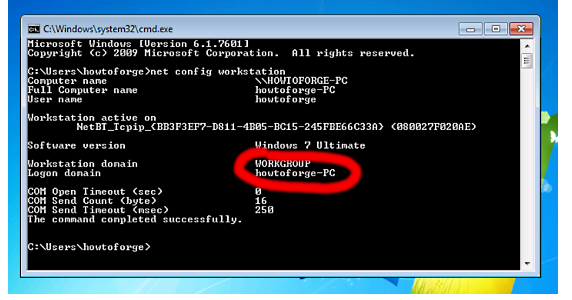
Samba server CentOS7 also allows for interoperability between Linux/Unix servers as well as Windows-based clients. You need to have one Windows machine to check the CentOS 7 server. The Windows machine must lie on the same workgroup. In order to check the value in the Windows machine, you need to run the “net config workstation” command in cmd prompt.

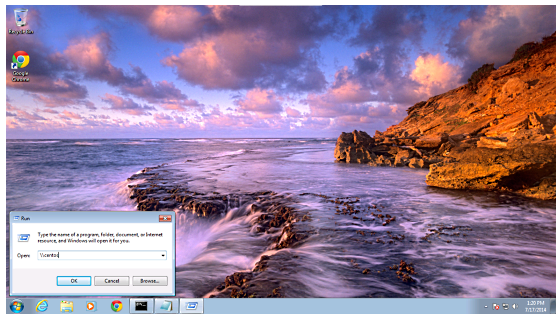
In order to make windows client reachable, add the entry of your server IP address in the Run terminal.

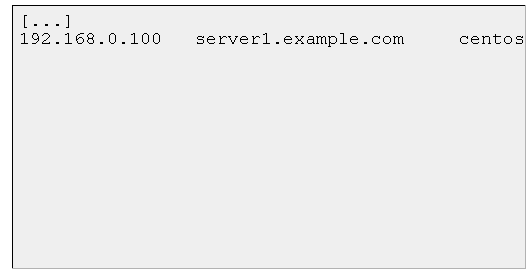
“notepad C:\Windows\System32\drivers\etc\hosts”

The example values are as follows.

Anonymous Samba Sharing

  • You need to install Samba using the following command.

“yum install samba samba-client samba-common”

  • The command will install Samba version 4.1.1. For Samba server configuration, edit the file /etc/samba/smb.conf after creating its backup as follows.

“mv /etc/samba/smb.conf /etc/samba/smb.conf.bak”

  • Use the entries like this.

“vi /etc/samba/smb.conf

mkdir -p /samba/anonymous
systemctl enable smb.service
systemctl enable nmb.service
systemctl restart smb.service
systemctl restart nmb.service”

  • Further, to get rid of CentOS 7 firewall-cmd, use the following command.

“firewall-cmd –permanent –zone=public –add-service=samba”

  • You should observe the output as follows.

“[root@server1 ~]# firewall-cmd –permanent –zone=public –add-service=samba

success

[root@server1 ~]#”

  • Now use the following command.

“firewall-cmd –reload”

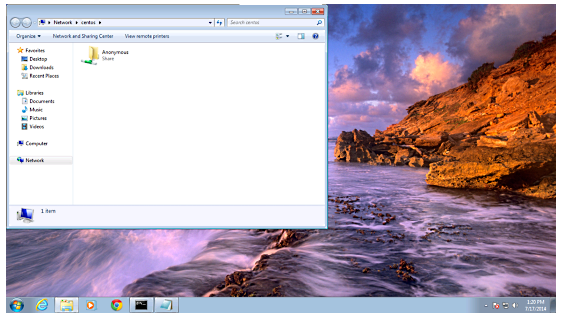
  • Now, CentOS sharing should be accessible in Windows. Go to Run and type “\\centos”.

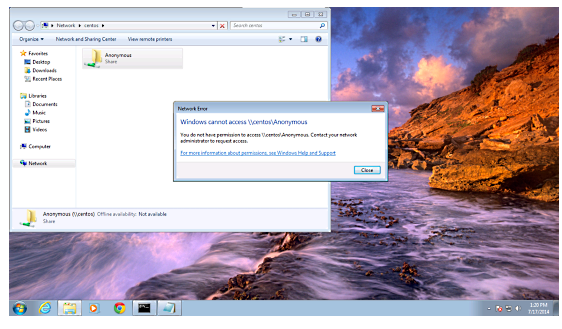
  • From your Windows PC, just search for the folder and try to create a text file. You will get an error of permission denied.

  • You can check the permission for the shared folder by using the following command.

“ls –l”

  • To give anonymous users the permission, use the following command.

“cd /samba

chmod -R 0755 anonymous/
chown -R nobody:nobody anonymous/

ls -l anonymous/”

  • Furthermore, we need to allow the selinux for the Samba configuration as shown below.

“chcon -t samba_share_t anonymous/”

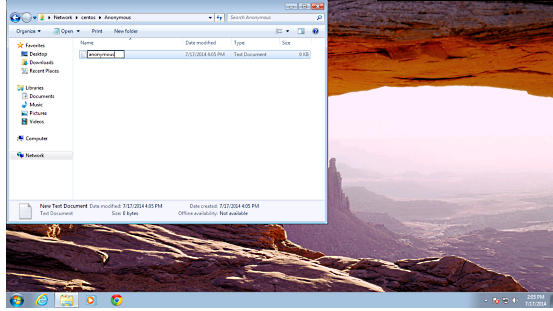
  • Now the anonymous user can browse and create the folder contents.

  • The content can also be cross-checked at server.

“ls -l anonymous/”

Secured Samba Server

  • For creating secured Samba Server, you need to create a group and a user for accessing Samba server with proper authentication.

“groupadd smbgrp

useradd srijan -G smbgrp

“smbpasswd -a srijan”

  • Now, create a folder in Samba and assign permissions like this.

“mkdir -p /samba/secured”

  • Again, we have to give permission Selinux to view the process.

“cd /samba
chmod -R 0777 secured/
chcon -t samba_share_t secured/”

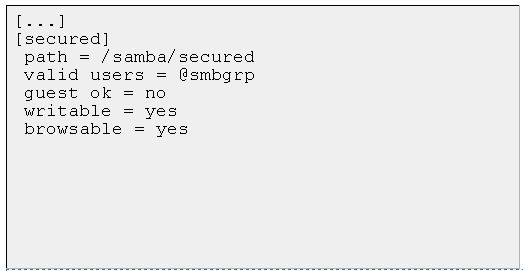
  • You need to edit the configuration file again.

“vi /etc/samba/smb.conf”

“systemctl restart smb.service

systemctl restart nmb.service “

  • You can check the settings further as follows.

“testparm”

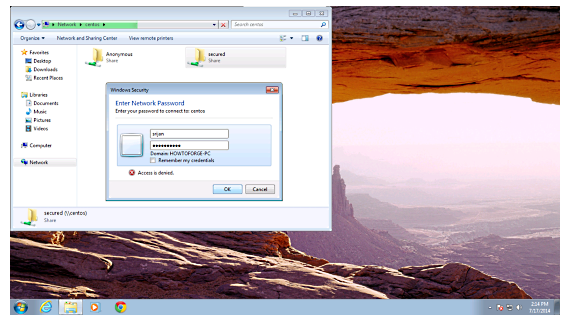
  • On the Windows device, check the folder now with proper credentials.


  • You will have to face the issue of permissions in order to give write permission to the user of Samba server.

“cd /samba
chown -R srijan:smbgrp secured/”

  • Finally, Samba user can write in the folder and the configuration is complete.

This article should be useful in applying CentOS Samba configuration for anonymous servers.


CentOS / RHEL: Delete Old Yum Repositories and Configuration Files

CentOS / RHEL: Delete Old Yum Repositories and Configuration Files

ow do I delete old yum repositories and configuration files under RHEL 5 or CentOS Linux server?

You can delete old yum repositories and its configuration files from /etc/yum.repos.d/ directory

Method #1: Delete Repo Configuration Files Using the rm Command

Type the following commands
# cd /etc/yum.repos.d/
# ls -l
Sample outputs:

-rw-r--r-- 1 root root  954 Aug 11  2010 epel.repo
-rw-r--r-- 1 root root 1054 Aug 11  2010 epel-testing.repo
-rw-r--r-- 1 root root  561 Dec 14  2010 rhel-debuginfo.repo
-rw-r--r-- 1 root root  222 Dec 14  2010 rhel-source.repo
-rw-r--r-- 1 root root  235 Jan 16 15:27 srpm.repo

To delete epel.repo, enter:
# rm epel.repo epel-testing.repo
### ***************************** ###
### make sure you delete GPG keys also ###
### ***************************** ###
# rm /etc/pki/rpm-gpg/RPM-GPG-KEY-EPEL
# yum clean all

Method #2: Delete Repo .rpm Package

First, find out repo package name, enter:
# rpm -qa | grep epel
Sample outputs:

epel-release-5-4

# yum remove epel-release-5-4
# yum clean all


Tuesday, September 23, 2014

How to Install and Configure OTRS 3.3.X in Centos 6.5 64 bit.

How to Install and Configure OTRS 3.3.X in Centos 6.5 64 bit.

Login as root

Donwload the rpm Package
wget http://ftp.otrs.org/pub/otrs/RPMS/rhel/6/otrs-3.3.5-02.noarch.rpm

Install the rpm Package
yum localinstall -y otrs-3.3.5-02.noarch.rpm

set selinux to permissive mode
setenforce 0

Restart Apache and MySQL
service httpd restart
service mysqld restart

Start OTRS service
service otrs start

Open web browser and add in url your server_ip_or_doamin
http://server_ip_or_domain/otrs/installer.pl
Step 1. Accept the GPL Agreement if you want to install OTRS
Step 2. Give Database details in
Step 3. It will ask for mail record, add the smtp & pop server detail
Step 4. At last it will give username and password, Kindly copy this info

Again Open web browser and add in url your server_ip_or_doamin for Agent Interface
http://server_ip_or_domain/otrs/index.pl

Again Open web browser and add in url your server_ip_or_doamin for Customer Interface
http://server_ip_or_domain/otrs/customer.pl


How to install & configure Tomcat 6 on Centos 6.5

How to install & configure Tomcat 6 on Centos 6.5

login as root

yum update
yum install -y java
yum install tomcat6 tomcat6-webapps tomcat6-admin-webapps

You can modify default port 8080 to 80 (if required)
vi /usr/share/tomcat6/conf/server.xml
<Connector port="80" protocol="HTTP/1.1"
connectionTimeout="20000"
redirectPort="8443" />

For tomcat admin modify file
vi /usr/share/tomcat6/conf/tomcat-users.xml
add line
<user username="admin" password="tomcatpass" roles="manager"/>
in between <tomcat-users> & </tomcat-users>

Add permanent at start-up
chkconfig tomcat6 on
Start tomcat
service tomcat6 start

Add port on iptables
iptables -I INPUT -p tcp --dport 8o -j ACCEPT
service iptables save
service iptables restart

Open browser and add url or ip of your server in address bar
click on Tomcat Manager give username and password as you have added on the file tomact-users.xml as admin and tomcatpass


How to install & configure OCSInventory 2.1 Agent on Centos 6.5 64 bit

How to install & configure OCSInventory 2.1 Agent on Centos 6.5 64 bit

OCSInventory 2.1 Agent Client Side installation on Linux Centos6

OCSInventory 2.1 Agent install on linux Centos 6.5 64 bit
yum install -y perl-XML-Simple perl-Compress-Zlib perl-Net-IP perl-LWP perl-Digest-MD5 perl-Net-SSLeay
yum install -y perl-Crypt-SSLeay perl-Net-SNMP perl-Proc-Daemon perl-Proc-PID-File perl-Sys-Syslog pciutils smartmontools monitor-edid

wget https://launchpad.net/ocsinventory-unix-agent/stable-2.1/2.1rc1/+download/Ocsinventory-Unix-Agent-2.1rc1.tar.gz
tar zxvf Ocsinventory-Unix-Agent-2.1rc1.tar.gz
cd Ocsinventory-Unix-Agent-2.1rc1
perl Makefile.PL
make
make install

Do you want to configure the agent
press y
Where do you want to write the configuration file?
press 2
Do you want to create the directory /etc/ocsinventory-agent?
press y
Should the old linux_agent settings be imported ?
Type n
What is the address of your ocs server?
Type server name or ip (192.168.1.126)
Do you need credential for the server?
Type n
Do you want to apply an administrative tag on this machine
Type n
Do yo want to install the cron task in /etc/cron.d
Type y
Do you want to create the /var/lib/ocsinventory-agent directory?
Type y
Should I remove the old linux_agent
Type n
Do you want to activate debug configuration option ?
Type y
Do you want to use OCS Inventory NG UNix Unified agent log file ?
Type n
Do you want disable SSL CA verification configuration option (not recommended) ?
Type n
Do you want to set CA certificate chain file path ?
Type n
Do you want to use OCS-Inventory software deployment feature?
Type y
Do you want to use OCS-Inventory SNMP scans feature?
Type y
Do you want to send an inventory of this machine?
Type y

To check the status of server 

ocsinventory-agent  -f


How to install & configure Nagios 4.x on Centos 6.5

How to install & configure Nagios 4.x on Centos 6.5

login as root user

yum install httpd php gcc glibc glibc-common gd gd-devel -y
useradd nagios
groupadd nagcmd
usermod -a -G nagcmd nagios
usermod -a -G nagcmd apache

wget http://prdownloads.sourceforge.net/sourceforge/nagios/nagios-4.0.1.tar.gz
tar zxvf nagios-4.0.1.tar.gz
cd nagios-4.0.1
./configure --with-command-group=nagcmd
make all
make install
make install-init
make install-config
make install-commandmode
make install-webconf

cp -R contrib/eventhandlers/ /usr/local/nagios/libexec/
chown -R nagios:nagios /usr/local/nagios/libexec/eventhandlers
htpasswd -c /usr/local/nagios/etc/htpasswd.users nagiosadmin

wget https://www.nagios-plugins.org/download/nagios-plugins-1.5.tar.gz
tar xzvf nagios-plugins-1.5.tar.gz
cd nagios-plugins-1.5
./configure --with-nagios-user=nagios --with-nagios-group=nagios
make
make install

SELinux is enforcing then add this line.
semanage fcontext -a -t httpd_sys_content_t /usr/local/nagios/

Set nagios at auto-start & service to start
chkconfig nagios on
chkconfig httpd on
service httpd start
service nagios start

http://localhost/nagios or http://yourserver/nagios
username nagiosadmin
password password


How to install & configure MySql 5.1 on Centos 6.5 64 bit

How to install & configure MySql 5.1 on Centos 6.5 64 bit

Login as root

yum update -y
yum install -y mysql mysql-server

Add for auto-restart
chkconfig mysqld on

Start MySql Server
service mysqld start

For secure run this script
mysql_secure_installation
add root password, remove test database and anonymous user

Add port on iptables
iptables -I INPUT -p tcp --dport 3306 -j ACCEPT
service iptables save
service iptables restart

mysql -uroot -pyourpassword
you will be in mysql prompt to quit type exit.


How to install & configure OCSInventory 2.1 Server on Centos 6.5 64 bit

How to install & configure OCSInventory 2.1 Server on Centos 6.5 64 bit

login as root

Download EPEL
wget http://download.fedoraproject.org/pub/epel/6/x86_64/epel-release-6-8.noarch.rpm
rpm -ivh epel-release-6-8.noarch.rpm
yum update -y
yum groupinstall -y "Development tools"
yum install -y httpd httpd-devel mod_perl mod_php mod_ssl php-gd php-mysql php-mbstring php perl
yum install -y perl-XML-Simple perl-Compress-Zlib perl-DBI perl-DBD-MySQL  perl-Net-IP perl-SOAP-Lite perl-Apache-DBI
yum install -y perl-Apache2-SOAP perl-XML-Entities
yum install -y mysql-server mysql make

Start Service at BootTime
chkconfig httpd on && chkconfig mysqld on

Start Service Iptables add ports 80 for Apache & 3306 for MySql
service iptables start
iptables -I INPUT -m multiport -ptcp --dport 80,3306 -j ACCEPT
service iptables save
service iptables restart

Start Service Apace & MySql
service httpd start && service mysqld start

Login to mysql
mysql -uroot
create database ocsweb;
grant all privileges on ocsweb.* to ocs@localhost identified by "password-2014";
exit

Download OCS SERVER for Linux
wget https://launchpad.net/ocsinventory-server/stable-2.1/2.1/+download/OCSNG_UNIX_SERVER-2.1.tar.gz
tar zxvf OCSNG_UNIX_SERVER-2.1.tar.gz
cd OCSNG_UNIX_SERVER-2.1
sh setup.sh

add enter at ever step

after installation restart apache

service httpd restart
setenforce 0
chmod 775 /usr/share/ocsinventory-reports/ocsreports
chmod 775 /usr/share/ocsinventory-reports/ocsreports/dbconfig.inc.php

http://localhost/ocsreports/

MySQL Login ocs
mySQLpassword password-2014
DatabaseName ocsweb
Mysql HostName localhost

rm /usr/share/ocsinventory-reports/ocsreports/install.php

http://localhost/ocsreports/

user admin
password admin

setenforce 1

***Very Important****
Kindly modify the file and add database password in it.

vi /etc/httpd/conf.d/z-ocsinventory-serv.conf
edit
PerlSetEnv OCS_DB_PWD password-2014
:wq


Thursday, August 21, 2014

link to use laptop intenet on mobile....check and try out

Go to admin command prompt.

Run below command

# netsh wlan set hostednetwork mode=allow ssid=test key=password

# netsh wlan start hostednetwork

# netsh wlan show hostednetwork

Open > Network and sharing center > change adapter settings >

Local area network Property

Select Sharing tab

FINISHED

Connect your Mobile to your laptop via Wi Fi.


https://www.youtube.com/watch?v=j_Nnzzu88gk

Wednesday, August 20, 2014

An A-Z Index of the Linux BASH command line

An A-Z Index of the Linux BASH command line

This is a list of the commands used in the Bash shell. Puppy uses the Ash shell up to v 1.0.2 which does not contain all of these commands. From version 1.0.3 (June 2005) these Bash commands are available.


if you add SHELL=/bin/bash to /etc/profile, rxvt and aterm will run bash automatically

alias : Create an alias
awk : Find and Replace text within file(s)

break : Exit from a loop
builtin : Run a shell builtin

cal : Display a calendar
case : Conditionally perform a command
cat : Display the contents of a file
cd : Change Directory
chgrp : Change group ownership
chmod : Change access permissions
chown : Change file owner and group
chroot : Run a command with a different root directory
cksum : Print CRC checksum and byte counts
clear : Clear terminal screen
cmp : Compare two files
comm : Compare two sorted files line by line
command : Run a command - ignoring shell functions
continue : Resume the next iteration of a loop
cp : Copy one or more files to another location
cron : Daemon to execute scheduled commands
crontab : Schedule a command to run at a later time
csplit : Split a file into context-determined pieces
cut : Divide a file into several parts

date : Display or change the date & time
dc : Desk Calculator
dd : Data Dump - Convert and copy a file
declare : Declare variables and give them attributes
df : Display free disk space
diff : Display the differences between two files
diff3 : Show differences among three files
dir : Briefly list directory contents
dircolors : Colour setup for `ls'
dirname : Convert a full pathname to just a path
dirs : Display list of remembered directories
du : Estimate file space usage

echo : Display message on screen
ed : A line-oriented text editor (edlin)
egrep : Search file(s) for lines that match an extended expression
eject : Eject CD-ROM
enable : Enable and disable builtin shell commands
env : Display, set, or remove environment variables
eval : Evaluate several commands/arguments
exec : Execute a command
exit : Exit the shell
expand : Convert tabs to spaces
export : Set an environment variable
expr : Evaluate expressions

factor : Print prime factors
false : Do nothing, unsuccessfully
fdformat : Low-level format a floppy disk
fdisk : Partition table manipulator for Linux
fgrep : Search file(s) for lines that match a fixed string
find : Search for files that meet a desired criteria
fmt : Reformat paragraph text
fold : Wrap text to fit a specified width.
for : Expand words, and execute commands
format : Format disks or tapes
free : Display memory usage
fsck : Filesystem consistency check and repair.
function : Define Function Macros

gawk : Find and Replace text within file(s)
getopts : Parse positional parameters
grep : Search file(s) for lines that match a given pattern
groups : Print group names a user is in
gzip : Compress or decompress named file(s)

hash : Remember the full pathname of a name argument
head : Output the first part of file(s)
history : Command History
hostname : Print or set system name

id : Print user and group id's
if : Conditionally perform a command
import : Capture an X server screen and save the image to file
info : Help info
install : Copy files and set attributes

join : Join lines on a common field

kill : Stop a process from running

less : Display output one screen at a time
let : Perform arithmetic on shell variables
ln : Make links between files
local : Create variables
locate : Find files
logname : Print current login name
logout : Exit a login shell
lpc : Line printer control program
lpr : Off line print
lprint : Print a file
lprintd : Abort a print job
lprintq : List the print queue
lprm : Remove jobs from the print queue
ls : List information about file(s)

m4 : Macro processor
man : Help manual
mkdir : Create new folder(s)
mkfifo : Make FIFOs (named pipes)
mknod : Make block or character special files
more : Display output one screen at a time
mount : Mount a file system
mtools : Manipulate MS-DOS files
mv : Move or rename files or directories

nice : Set the priority of a command or job
nl : Number lines and write files
nohup : Run a command immune to hangups

passwd : Modify a user password
paste : Merge lines of files
pathchk : Check file name portability
popd : Restore the previous value of the current directory
pr : Convert text files for printing
printcap : Printer capability database
printenv : Print environment variables
printf : Format and print data
ps : Process status
pushd : Save and then change the current directory
pwd : Print Working Directory

quota : Display disk usage and limits
quotacheck : Scan a file system for disk usage
quotactl : Set disk quotas

ram : ram disk device
rcp : Copy files between two machines.
read : read a line from standard input
readonly : Mark variables/functions as readonly
remsync : Synchronize remote files via email
return : Exit a shell function
rm : Remove files
rmdir : Remove folder(s)
rpm : Remote Package Manager
rsync : Remote file copy (Synchronize file trees)

screen : Terminal window manager
sdiff : Merge two files interactively
sed : Stream Editor
select : Accept keyboard input
seq : Print numeric sequences
set : Manipulate shell variables and functions
shift : Shift positional parameters
shopt : Shell Options
shutdown : Shutdown or restart linux
sleep : Delay for a specified time
sort : Sort text files
source : Run commands from a file `.'
split : Split a file into fixed-size pieces
su : Substitute user identity
sum : Print a checksum for a file
symlink : Make a new name for a file
sync : Synchronize data on disk with memory

tac : Concatenate and write files in reverse
tail : Output the last part of files
tar : Tape ARchiver
tee : Redirect output to multiple files
test : Evaluate a conditional expression
time : Measure Program Resource Use
times : User and system times
touch : Change file timestamps
top : List processes running on the system
traceroute : Trace Route to Host
trap : Run a command when a signal is set(bourne)
tr : Translate, squeeze, and/or delete characters
true : Do nothing, successfully
tsort : Topological sort
tty : Print filename of terminal on stdin
type : Describe a command

ulimit : Limit user resources
umask : Users file creation mask
umount : Unmount a device
unalias : Remove an alias
uname : Print system information
unexpand : Convert spaces to tabs
uniq : Uniquify files
units : Convert units from one scale to another
unset : Remove variable or function names
unshar : Unpack shell archive scripts
until : Execute commands (until error)
useradd : Create new user account
usermod : Modify user account
users : List users currently logged in
uuencode : Encode a binary file
uudecode : Decode a file created by uuencode

v : Verbosely list directory contents (`ls -l -b')
vdir : Verbosely list directory contents (`ls -l -b')

watch : Execute/display a program periodically
wc : Print byte, word, and line counts
whereis : Report all known instances of a command
which : Locate a program file in the user's path.
while : Execute commands
who : Print all usernames currently logged in
whoami : Print the current user id and name (`id -un')

xargs : Execute utility, passing constructed argument list(s)
yes : Print a string until interrupted